

An illustrative example. A company has a stock dashboard that refreshes every hour. The refresh job finishes successfully every time. But one of the warehouses has stopped sending its export: an integration broke, or someone changed a password. The dashboard looks alive, the last-refresh time is recent, and the products from that warehouse are shown with yesterday's stock levels or even as zero. A purchasing manager looks at the dashboard and orders what is actually in stock, or fails to order what has already run out.
There was no failure in the usual sense: no job crashed and no alert went off. It was not the calculation that was wrong but the input data, and nobody found out.
A green status answers the wrong question
A job status answers the question "did the job run?" The person making the decision needs an answer to a different question: "can I use this result now?"
The gap between the two is large. A job can successfully recalculate a report from data that has stopped updating. It can build a summary from three sources instead of four. It can calculate everything correctly, and then the result sits in a queue for so long that it is out of date by the time it is delivered. In all three cases the job is "green".
That is why freshness checks are placed not instead of job monitoring but next to it: they look at the data itself, not at the process that handled it.
Acceptable age depends on the decision
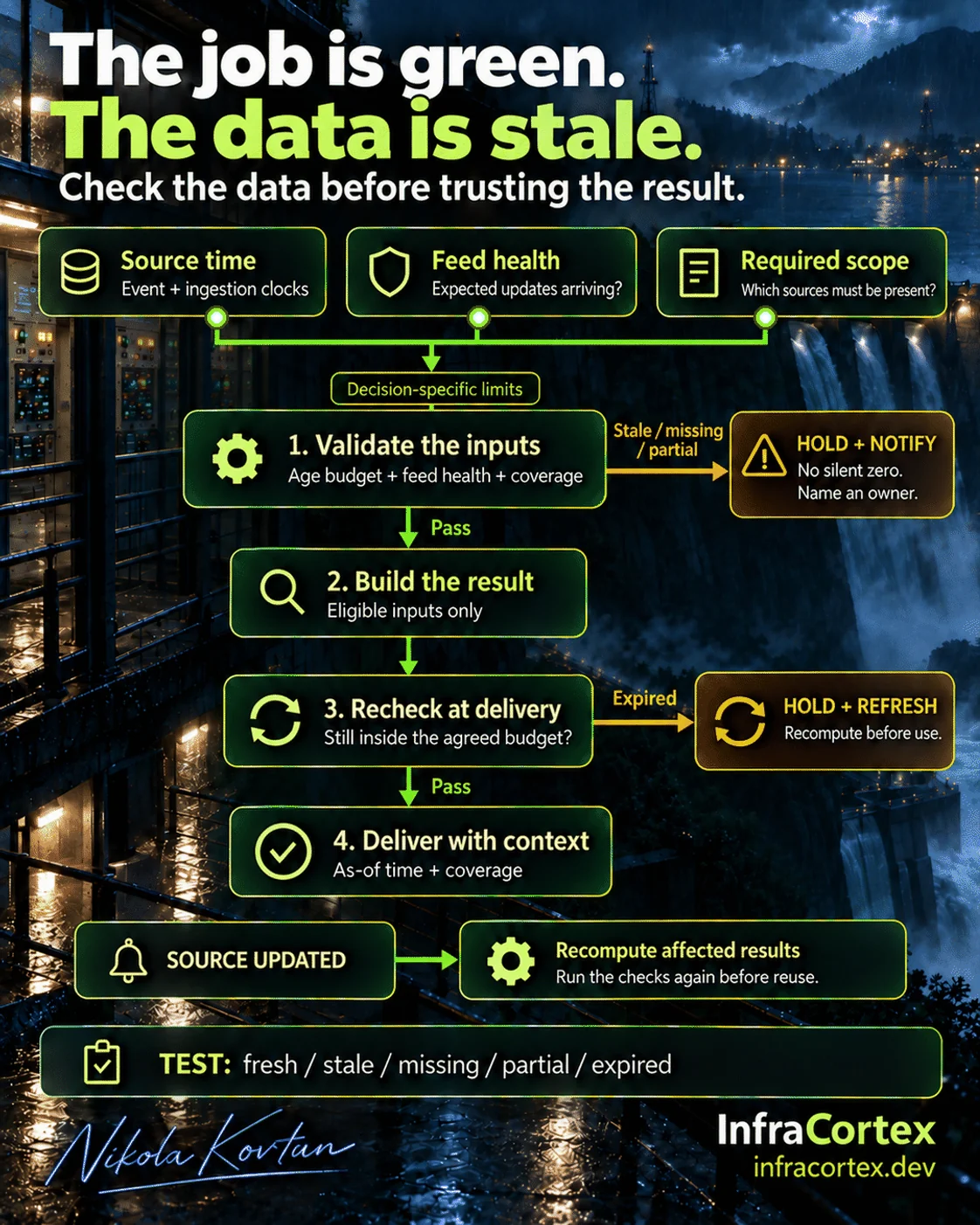
Start with the question: how old can the data be for this particular decision? That is the acceptable data age. A daily planning report and an operational stock-availability check do not necessarily need the same limit. Yesterday's data may be fine for the first, while even an hour may be too long for the second.
The limit is set by the process owner, not by the developer. A developer can tell you how often a source updates at all, but only the person making the decision knows how much delay is still safe for them.
An old event is not an error in itself. An analysis of last year needs exactly that old data. Acceptable age applies to a specific use: the same table can be fresh for a quarterly report and stale for a decision about today's order.
Three checks before the calculation
Time: when it happened and when it arrived
Every record has at least two times: when the event happened or the data snapshot was taken, and when your system received that data. Store them separately.
A recent import does not make an old event recent. If yesterday's export arrived this morning, it still contains yesterday's stock levels. If you calculate age from the import time, the dashboard will say "data is fresh" even though it describes yesterday.
Also find out what exactly the timestamp means in each source. It may be the time of the event, the time the export was generated or the time the record was last changed. That determines how age is calculated.
Feed health: are updates arriving?
You need to know how often each source normally sends data and notice when updates stop arriving. Silence comes in two kinds: there really were no events, for example the shop is closed on its day off, or the source has gone quiet. Without an expected arrival schedule you cannot tell these cases apart.
Coverage: are all sources present?
Check that the calculation includes all required sources and all the relevant parts of the business: every warehouse, shop, legal entity or region that should be in the report. A partial load should not look like a complete report. If data has arrived for three warehouses out of four, the company total cannot be shown as the company total.
Missing is not zero
The most dangerous substitution is turning an unavailable source into a zero. A zero looks like a fact: "there were no sales", "stock has run out". In reality it means "we don't know".
If required data is stale, missing or incomplete, the result has two honest options:
- hold it and tell a specific owner what is wrong;
- deliver it with an explicit note about the limitation: which source is missing and what is inaccurate in the result because of it.
The process owner decides in advance, for each report, which option applies. One thing matters: this situation must have its own state, not a quiet continuation of the work. Similar logic with an "unknown" outcome is needed when data is handed between systems; we covered it in our article on timeouts when sending an order to the ERP.
One more check before delivery
If the input data has passed the checks, the result can be built. But the checks do not end there. The calculation may wait in a queue, the report may go out on a schedule a few hours later, the answer may be shown to the user long after the calculation started. A result that was fresh when the calculation began may exceed the acceptable age by the time it is delivered.
So the age of the data is checked again immediately before the result is seen by a person or received by the next system. If the limit is exceeded, the result is held back and recalculated rather than sent as it is.
"Data as of …" next to the answer
Show, next to the result, the time the data is current as of and its coverage: "Stock as of 09:00, excluding warehouse 3". It is a short line, but it changes how a person reads the numbers. They see not only the answer but also the limits within which that answer can be trusted.
When a source recovers, it is not enough to simply wait for the next scheduled refresh. Find the results that were built without it or with its stale data, recalculate them and run the checks again before they are used.
If you build your data warehouse on dbt, it has a built-in freshness check: for a source or a model you set how old the most recent data can be before the check reports a warning or an error. It is a good foundation, but it checks the data in the warehouse. The re-check before delivery and the "data as of …" note still have to be done where the result is shown.
How to test before launch
The main test is simple: deliberately stop one source and leave the reporting job running. What does the system do: report that data is missing, or keep presenting a confident answer?
The test set should include five cases:
- fresh data: the result is delivered with a "data as of …" note;
- a delayed source: the data arrived but is older than the acceptable age;
- a stopped source: no updates at all;
- a partial load: only some of the warehouses or shops arrived;
- data that went stale while the result was waiting to be delivered.
And separately, test recovery: the source is back, the affected results are recalculated and the checks are passed again.
Checklist
- For every decision that relies on the report, the process owner has set an acceptable data age.
- Event time and receipt time are stored separately, and it is known what the timestamp means in each source.
- Every source has a known expected update schedule, and a stop in updates is noticed.
- The calculation is checked to include all required sources and all relevant warehouses, shops or legal entities.
- Missing data is never turned into zero.
- If the checks fail, the result is held or delivered with an explicit note, and a named owner is told.
- The age of the data is checked again before delivery.
- The result shows the time the data is current as of and which sources it includes.
- After a source recovers, the affected results are recalculated and checked again.
- In a test environment a source has been deliberately stopped, and the system reported the missing data instead of giving a confident answer.
Where to start
Take one report or one dashboard that decisions are regularly made from, and one such decision. Write down the sources, how often each updates, the acceptable data age and who is responsible for the result. First add a "data as of …" line with the list of sources next to the result: that alone will show where the picture is incomplete. Then add the checks and run a test with a stopped source.
If you have a report that is assembled automatically from several systems, take a look at the "Ads and sales → one report" scenario on the process automation page. The useful question to ask of such a report is not only "did it build?" but also "can someone safely use it right now?"