

An illustrative example. At a distribution company, a manager approves a purchase request, and the automation system sends it to the ERP as a purchase order to a supplier. The ERP saves the order, but the connection drops before the response reaches the integration. A "timeout" appears in the process log.
There are two easy reactions, and both are bad. You can press "retry" and end up with a second order with the same supplier. Or you can mark the task as failed, and then someone enters the order by hand, which again means a second order.
Has the purchase fallen through? Not necessarily. Has the handoff completed? Not verified yet. A timeout only tells you that no response arrived.
We briefly described how a resend creates a duplicate in our article on enquiries and the CRM. Here we look at how to set up the handoff so that an unknown outcome turns into neither a duplicate nor a lost order.
A timeout means "unknown"
For the case where no response arrives, the handoff operation needs a separate state: not "success" and not "error", but "outcome unknown". While the operation is in that state, no new order may be created, and it is too early to treat the purchase as failed.
It is just as important to agree on what counts as completion. "Done" for this operation means that the order has been created in the ERP and its number has been received. It does not mean that the supplier has accepted the order, the goods have arrived or the invoice has been paid. Those steps have their own confirmations.
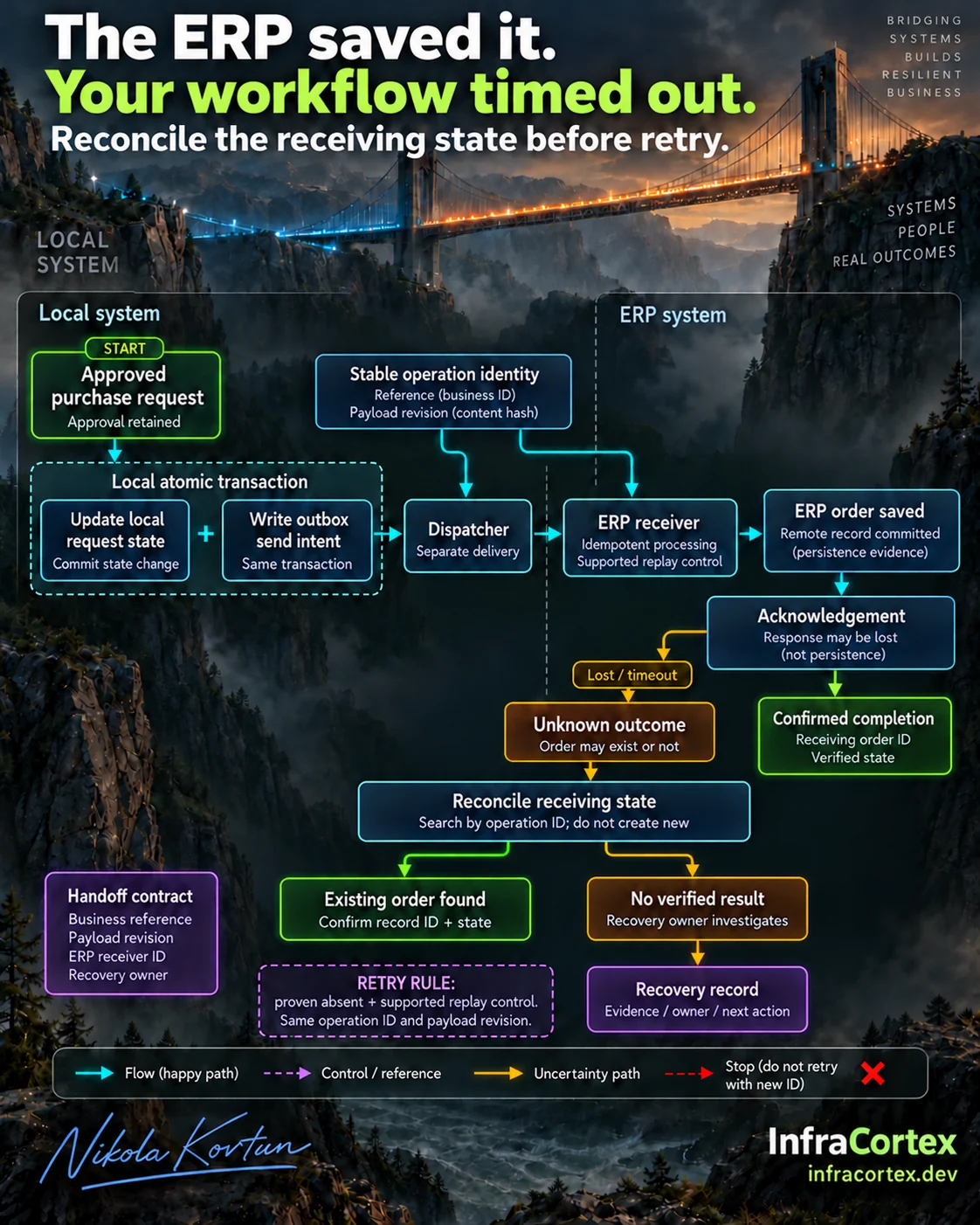
What the operation needs before anything is sent
A permanent operation ID
The identifier is assigned once, when the request is approved, and does not change on retries. If the integration generates a new number on every attempt, each attempt looks like a new order to the ERP. Only a genuinely new order needs a new identifier.
The approved version of the data
Along with the identifier, store the version of the order that was approved: the supplier, line items, quantities and prices. If the request was changed after approval, that is a different version, and the decision to send it has to be made again. A retry must send exactly what was approved.
Retry protection on the ERP side
If your ERP's API supports an idempotency key, pass the operation ID in it and follow that system's rules. Such keys may only be kept for a limited time, and a retry with the same key but different data may be rejected.
If there is no such support, write the operation ID into the order itself, for example into an external document number field, if there is one. Then you can search by it. Bear in mind that a field called "idempotency key" guarantees nothing by itself. What matters is what the system actually does on a retry, and that has to be tested in a test environment, not just read in the documentation.
Transactional outbox: the intention to send must not get lost
The second trap is inside your own system. The process does two things: it marks the order as "sent" on its side, and it actually sends the request to the ERP. If something fails between the two, you get one of two results: the mark is there but nothing was sent, or the request was sent but there is no mark.
The transactional outbox pattern solves this as follows. A single transaction in the local database saves both the new state of the request and a "send the order" record in a separate table, which is what is called the outbox. Sending is handled by a separate process: it picks up records from the outbox, passes them to the ERP and records the result. If it crashes halfway through, the record does not disappear and will be processed again.
The flip side is that the same record may be sent more than once. So an outbox only works together with retry protection on the receiving side, or with the reconciliation described below.
The pattern fits when the process has its own database that you control. If the automation is built in a cloud workflow builder without such a database, you need an equivalent: a reliable place where the intention to send is recorded before sending and does not vanish when something fails.
"Not found" does not mean "not created"
After a timeout, the natural thing is to look in the ERP for an order with your identifier. But an empty search result does not prove that the order does not exist:
- search can lag behind writes: the document is already saved but not yet visible in a list or report;
- search can be incomplete: you searched the wrong field, or used an account that cannot see documents belonging to another warehouse or legal entity;
- the first request may still be running: the check overtakes an operation that has not finished yet.
So the check after a timeout searches by the operation ID, uses an account with access to all the relevant documents, and is repeated after an agreed interval. If even then the outcome cannot be confirmed either way, the operation stays in the "unknown" state. A silent retry with a new identifier in this situation is the shortest route to a duplicate.
Three outcomes that do not overlap
Every handoff operation must end in exactly one of three outcomes.
- Confirmation received. The ERP returned the order number, and the integration checked that the order exists and is in the expected state. The number is stored next to the operation ID.
- Response lost, order found. Reconciliation found the order by the operation ID. The operation is linked to that order and closed, and no new order is created.
- The outcome could not be confirmed. The operation goes to the recovery owner together with the evidence: what was sent, when, with which identifier and what the checks showed. The owner decides what to do next and records the decision.
It is better to build the handoff report around these three outcomes rather than "success or error". Then the third outcome is visible as a separate piece of work and does not get lost among other failures.
An owner and regular reconciliation
The third outcome has a name
The recovery owner is a specific person or role, for example the head of purchasing or the ERP administrator. They need a queue that shows the operation ID, the approved version, the attempts, the results of the checks and the next action. They do not need full access to all the data in the ERP for this. Also agree on how quickly they work through the queue. That depends on how urgently the supplier needs to receive the order.
Scheduled reconciliation
As well as handling individual cases, you need regular reconciliation: a job that compares the operations on your side with the documents in the ERP and looks for:
- operations that stay in the "sent" or "unknown" state for too long;
- orders in the ERP with your identifier that are not linked to any operation;
- two orders with the same identifier, a sign that retry protection did not work.
Clear-cut cases, as in the second outcome, can be closed by the reconciliation itself. Everything else goes to the owner's queue.
Supplier invoices: the same case
The same logic is needed when posting incoming invoices. If the connection dropped after the ERP had already saved the invoice, creating it again without checking will produce a duplicate document. A permanent identifier, a search by that identifier and the three outcomes work here exactly as they do for orders.
Pre-launch checklist
- The operation has an identifier that is assigned at approval and does not change on retries.
- The approved version of the data is stored, and a retry sends exactly that version.
- It is known how the ERP handles a retry: an idempotency key and how long it is kept, or a search by an external number.
- The intention to send is recorded together with the state change, via an outbox or an equivalent.
- The process has an "outcome unknown" state, separate from success and error.
- The check after a timeout searches by the operation ID, with sufficient permissions, and is repeated after an interval.
- Every operation ends in one of the three outcomes, and the report is built around them.
- A recovery owner is assigned and has a queue with the evidence.
- Regular reconciliation finds stuck operations, unlinked orders and duplicates.
- In a test environment, a confirmation has been deliberately lost, and recovery found the existing order instead of creating a new one.
Where to start
Take one handoff, for example "an approved request becomes a purchase order to a supplier", and answer two questions: what proves that the handoff went through, and who is responsible for the outcome when there is no proof. Then add the "unknown" state, assign an owner and run one test with a lost confirmation in a test environment. The other arrows on the process diagram can be checked the same way.
If you would like to check one of your own ERP handoffs like this, describe it to us, and together we will work out what currently happens on your side when a timeout occurs.